If you’ve ever tried to make a pile of PDFs queryable actually queryable, not just searchable by filename you’ve run into the same wall the rest of us have. OCR is not extraction. Extraction is not understanding. Understanding is not retrieval. And retrieval, on its own, is not an answer.
This post walks through a stack I’ve been using to bridge those gaps end-to-end on AWS. The shape is conventional Retrieval-Augmented Generation (RAG), but the choice of components matters more than the buzzword does. Specifically:
- Amazon Textract for OCR + layout-aware extraction
- Amazon Titan Text Embeddings v2 for turning chunks into vectors
- pgvector in Postgres for storing and searching those vectors
- Claude (via Bedrock) for synthesis
Each piece earns its slot for a different reason. Let’s go through them.
1. Textract OCR is the easy part
The first instinct with PDFs is to reach for pdfminer or Tesseract, get text out, and start chunking. That works for clean PDFs. It falls apart the moment the document was scanned, photographed, rotated, or laid out in two columns which, in practice, is most of the documents anyone actually wants to query.
Textract solves three problems at once:
- OCR with AWS-grade accuracy on noisy scans
- Layout it returns blocks with bounding boxes, reading order, and parent/child relationships so you can reconstruct paragraphs and tables instead of getting a wall of text
- Forms and tables
AnalyzeDocumentwithFORMSandTABLESfeatures returns structured key-value pairs and cell grids, not just strings
response = textract.analyze_document(
    Document={"S3Object": {"Bucket": bucket, "Name": key}},
    FeatureTypes=["FORMS", "TABLES"],
)
The thing to internalize is that Textract gives you structure, not just text. If you flatten that structure too early " ".join(all_blocks) and ship it you’ve thrown away the most useful signal for chunking later. Keep the block hierarchy around. You’ll want it.
A couple of practical notes:
- Textract has both sync (
AnalyzeDocument) and async (StartDocumentAnalysis) APIs. Anything over a few pages, use async with SNS notifications. Sync will time out on you in production at the worst possible moment. - Cost adds up fast at scale (~$1.50/1k pages for FORMS + TABLES). Cache aggressively by document hash, not filename. The same PDF re-uploaded should never be re-Textracted.
2. Chunking, the part nobody likes
Between extraction and embedding sits the unsexy work of chunking. There is no correct answer here, only tradeoffs.
The naive approach fixed 512-token windows with 50-token overlap is the worst kind of “good enough.” It wins on simplicity and loses every time a relevant fact straddles two chunks.
What’s worked better for me:
- Chunk along Textract’s structure, not along token count. A paragraph block, a table row, a form key-value pair these are natural semantic units.
- Attach metadata to every chunk: source document ID, page number, block type, bounding box. You’ll thank yourself when you need to cite or render the answer back to the original page.
- Re-chunk if a unit is too long. Set a soft cap (~800 tokens) and split on sentence boundaries when you exceed it. Don’t split mid-sentence to hit an exact count.
The bounding box metadata is what unlocks “show me where this came from in the original PDF” a feature users notice immediately when it’s there and distrust the whole system when it isn’t.
3. Titan Text Embeddings v2, boring on purpose
For embedding I default to Amazon Titan Text Embeddings v2 (amazon.titan-embed-text-v2:0). It’s not the most-talked-about embedding model, and that is largely a feature.
Why I keep coming back to it:
- 1024 dimensions by default, configurable down to 512 or 256. You can trade recall for storage and speed without re-embedding.
- In-region, in your VPC, no data leaves the AWS perimeter. This matters more than it sounds for anything regulated.
- 8k token input window you can embed entire chunks without aggressive truncation.
- Cheap: ~$0.02 per million input tokens at the time of writing.
response = bedrock.invoke_model(
    modelId="amazon.titan-embed-text-v2:0",
    body=json.dumps({
        "inputText": chunk_text,
        "dimensions": 1024,
        "normalize": True,
    }),
)
embedding = json.loads(response["body"].read())["embedding"]
Pass normalize: True and you can use cosine similarity as plain inner product downstream small thing, but it makes the SQL cleaner.
4. pgvector yes, just Postgres
The pull toward dedicated vector databases (Pinecone, Weaviate, Qdrant) is real, and for some workloads it’s the right call. For most, it isn’t.
pgvector turns a normal Postgres database into a vector store with one extension:
CREATE EXTENSION IF NOT EXISTS vector;

CREATE TABLE chunks (
    id UUID PRIMARY KEY DEFAULT gen_random_uuid(),
    document_id UUID NOT NULL REFERENCES documents(id),
    page INT NOT NULL,
    content TEXT NOT NULL,
    embedding VECTOR(1024)
);

CREATE INDEX chunks_embedding_idx
    ON chunks USING hnsw (embedding vector_cosine_ops);
That’s the whole setup. Now your similarity search lives in the same database as the rest of your application data, which means:
- One transaction boundary
- One backup story
- One auth model
- Joinable. You can filter by
document_id,user_id,created_at, and do vector search in a single query.
SELECT id, content, page, 1 - (embedding <=> $1) AS similarity
FROM chunks
WHERE document_id = ANY($2)
ORDER BY embedding <=> $1
LIMIT 10;
The <=> operator is cosine distance. The WHERE clause is the killer feature you can pre-filter by metadata before the vector search, which a lot of dedicated vector DBs make awkward.
HNSW is the index to use over IVFFlat for most read-heavy workloads. Tune m and ef_construction for your recall/latency target; the defaults are reasonable for under ~1M vectors.
When do you outgrow pgvector? Roughly when you’re past ~10M vectors with sub-100ms p99 requirements and your Postgres instance is already working hard. That’s a good problem to have. Solve it later.
5. The LLM synthesis, not retrieval
The model at the end of the pipeline is doing one job: take a question and a small stack of retrieved chunks, and write a grounded answer with citations. That’s it. Don’t ask it to be the retrieval layer too.
I use Claude (via Bedrock) for this. The prompt shape that’s worked consistently:
System: You answer strictly from the provided context. If the
context doesn't contain the answer, say so. Cite the chunk IDs
you used in [brackets].

User:
<context>
[chunk_1_id] {chunk_1_text}
[chunk_2_id] {chunk_2_text}
...
</context>

Question: {user_question}
A few things that matter more than the model choice:
- Cite the chunk IDs, not the source filenames. You can hydrate citations into rich UI links on the way out, and you can verify groundedness by checking the cited chunks contain the claim.
- Keep the context tight. Top-5 to top-10 chunks is usually enough. Stuffing 50 chunks in to “be safe” makes answers worse, not better.
- Use prompt caching on the system prompt. It’s a nontrivial cost saving on any conversational interface where the system block is stable across turns.
Putting it together
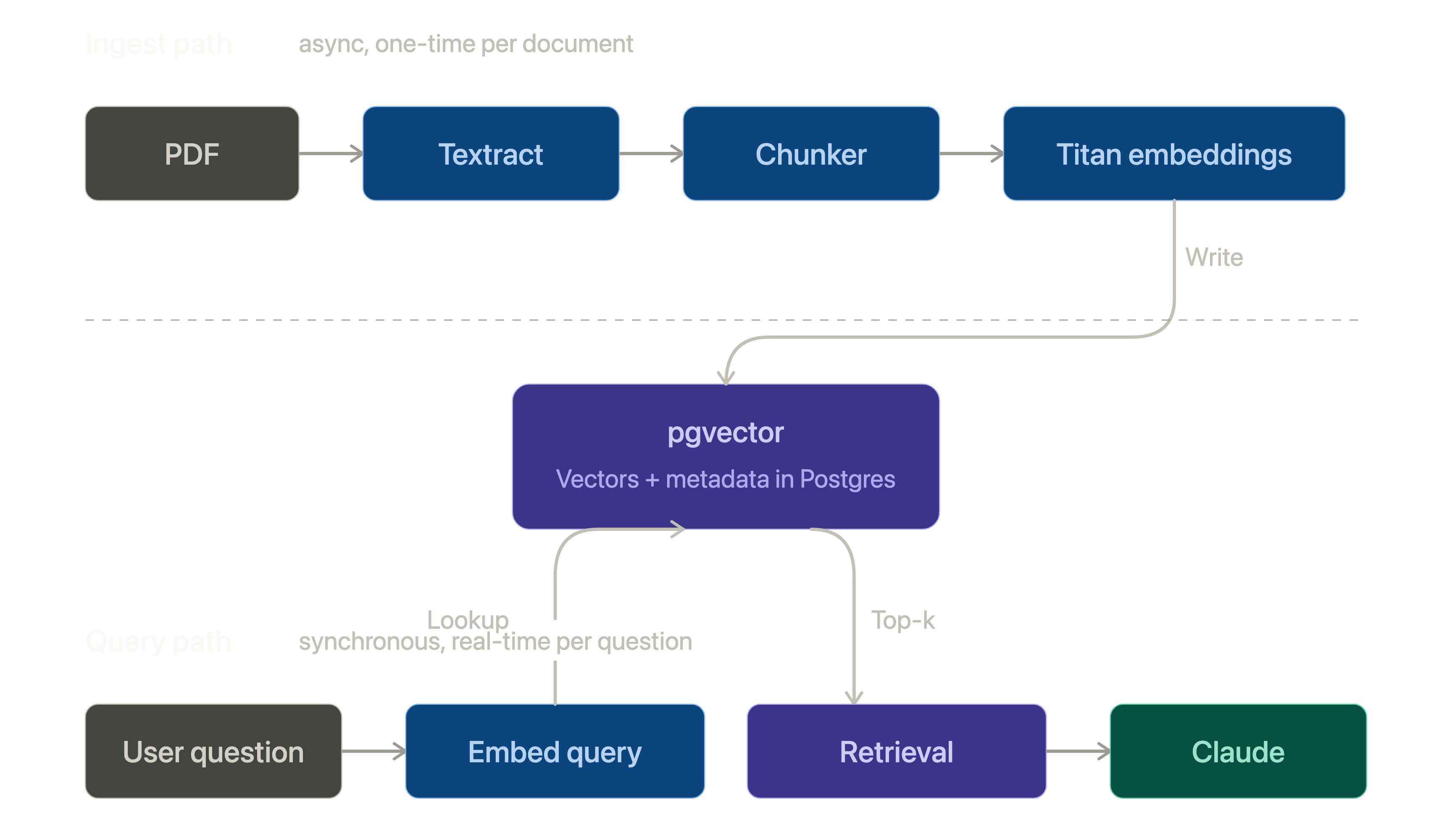
The end-to-end flow:
PDF
  ↓ Textract (async)
structured blocks
  ↓ chunker
chunks + metadata
  ↓ Titan embeddings
vectors
  ↓ pgvector
indexed store
  ↓ retrieval (cosine + metadata filter)
top-k chunks
  ↓ Claude on Bedrock
grounded answer with citations
None of these pieces are exotic. That’s the point. The interesting design work isn’t in picking novel components; it’s in the seams chunking strategy, metadata you carry through, how you cite back to the source, what you cache and where.
Build it boring. The clever parts will reveal themselves once it’s running.